By popular demand, 3 new features for the Windows app along with some bug fixes to improve the Windows app have been deployed. Please update your Windows app to the latest version 3.0.1.5 by clicking the update button in the top right corner of the Dashboard screen. Watch the video below to learn more or scroll down for the change log.
Change Log:
NEW- Product Image is now available via hover icon,
NEW- Historical Keepa chart is moved to its own hover icon,
NEW- Renaming files in previous results list is now possible with right click,
FIX- Run state after failed license check did not reset to Run,
FIX- Adding API credentials required clicking “Save”,
FIX- Extra column data is now retained for products not found on Amazon.
Hope you enjoy the update! Please be sure to visit, subscribe and share our Facebook, YouTube & new Twitter page to be the first to get the latest updates on program developments and new features!
????New Web App feature provides personalized recommendations for Amazon sellers delivered DIRECTLY from Amazon!
????Amazon Business Product Opportunities (BPO) answers: “What products should I list on Amazon that will increase my B2B Sales?”
????Available FIRST on stage.analyzer.tools
What are Business Product Opportunity (BPO) reports?
Personalized Amazon recommendations to sellers for B2B products that are either:
Lacking enough sellers to meet demand, which means you can sell on the existing product listing, OR
Products that have demand but are not sold on Amazon yet! This means you can source the product and create a new product listing!
Data is personalized to your selling history and comes DIRECTLY from Amazon to answer the question: “What products should I list on Amazon that will increase my B2B Sales?”
⚡Interested in BPO?⚡ Sign up for a Web App plan here: SIGN UP
????Learn more about Business Product Opportunity (BPO) reports here: CLICK HERE
Hope you enjoy the update! Please be sure to visit, subscribe and share our Facebook, YouTube & new Twitter page to be the first to get the latest updates on program developments and new features!
*Please see the July 2024 and June 2022 updates below which are not covered in the video.
July 2024 Update notes:
Removed De-personalization as Amazon is no longer supporting it. BPO reports now require a selling history on the Amazon Business marketplace,
Removed scheduling to reduce result clutter.
June 2022 Update notes:
New user interface for the BPO configuration screen,
Added De-personalization as an option as well as Category selection,
Added functionality to manage currently scheduled reports and schedules.
What are Business Product Opportunity (BPO) reports?
Personalized or De-personalized (updated June 2022) Amazon recommendations to sellers for B2B products that are either:
Lacking enough sellers to meet demand, which means you can sell on the existing product listing, OR
Products that have demand but are not sold on Amazon yet! This means you can source the product and create a new product listing!
Personalized reports show results based on your selling history. De-personalized reports ignore your selling history and may produce new BPO opportunities
Data is delivered DIRECTLY from Amazon to answer the question: “What products should I list on Amazon that will increase my B2B Sales?”
⚡Interested in BPO?⚡ Sign up for a Web App plan here: SIGN UP
What type of BPO reports are available?
Products Already Sold on Amazon
Products that are already sold on Amazon where Amazon sees more demand than supply. In other words, these products need more sellers!
Products Not Currently Sold on Amazon
Products that are not sold on Amazon yet, but Amazon Business customers have indicated they would like to see them sold. Ka-Ching!
How often should I scan BPO reports?
Reports data is refreshed by Amazon every week with up to 1,000 results per report. You can select the “Schedule Weekly Processing” option for the app to scan new BPO reports for you automatically when new data is available.
What new data is available with BPO Reports?
BPO reports have certain data columns which are new and unique to BPO Reports. Below is a chart showing the new data columns.
Column
Products Already Sold on Amazon
Products Not Currently Sold on Amazon
Description
B2B Sales Rank
✓
Sales Rank as it relates only to Amazon Business purchases
B2B Sales Rank Growth
✓
Growth in B2B Sales Rank expressed as HIGH, MEDIUM, LOW
Brand You Offer
✓
Indicates if product is a Brand you are already offering for sale on Amazon
Category You Offer
✓
Indicates if product is in a Category where you’re offering products for sale on Amazon
Lowest Price In Last Week
✓
Lowest Sell Price for product in the last week
Page Views
✓
Volume of product Page Views expressed as HIGH, MEDIUM, LOW
Product Performance
✓
Product Performance expressed as HIGH, MEDIUM, LOW
Sub Category
✓
Product Sub Category
Category
✓
✓
Product Category
EAN
✓
✓
EAN, if available
ISBN
✓
✓
ISBN, if available
UPC
✓
✓
UPC, if available
Buyer Industry
✓
The industry the Buyer is in that made a product request to Amazon
Date Buyer Requested
✓
Date when the Buyer made a product request to Amazon
Please be sure to visit, subscribe and share our Facebook, YouTube & new Twitter page to be the first to get the latest updates on program developments and new features!
Ever wonder what top Amazon sellers sell? This stage.analyzer.tools search feature allows you to stalk a competing seller’s storefront and pull the seller’s products into stage.analyzer.tools for sourcing and analysis. In this video we demonstrate the Amazon competing seller search, including the new Deep Scan feature and analyze our findings.
Using Search By Competing Seller
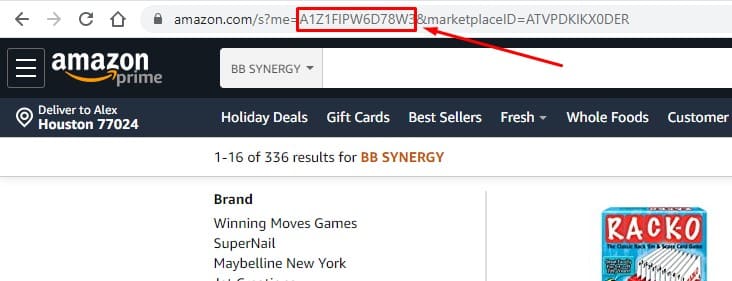
To use this feature you will need the competing seller’s Seller ID. You can find it in the URL generated by clicking on a seller’s storefront as shown below and demonstrated in the video. Simply look for the string of letters and numbers between “me=” and “&marketplaceID”. Open stage.analyzer.tools Competing Seller search and copy/paste this ID into the window and click “Process”.
Deep Scan
Amazon will show a maximum of 2,400 results on a seller’s storefront. In the event a seller has more than 2,400 products, the Deep Scan feature can be used to extract up to 100,000 of a seller’s products. Deep scan is only recommended for seller storefronts exceeding 2,400 products since it is a slower process than regular Competing Seller Search.
Deep scan is only available with the Web app Pro tier.
Two major features features are being added to the Web app tomorrow, competing seller storefront search & Amazon Browser search! These have by far been the most requested features from our Windows application that have been vastly improved and added to the web application. Please watch the video demo to see them in action!
In addition to Browser and Seller search, the following additional features are also being added to the Web app with this update:
NEW- Copy and Rename functionality for file names in Recent List & Favorite list,
FIXED- Amazon seller & review bugs in the MX marketplace,
FIXED- Marketplace auto-select bug in certain cases when only UK API credentials present.
Hope you enjoy the update! Please be sure to visit, subscribe and share our Facebook, YouTube & new Twitter page to be the first to get the latest updates on program developments and new features!
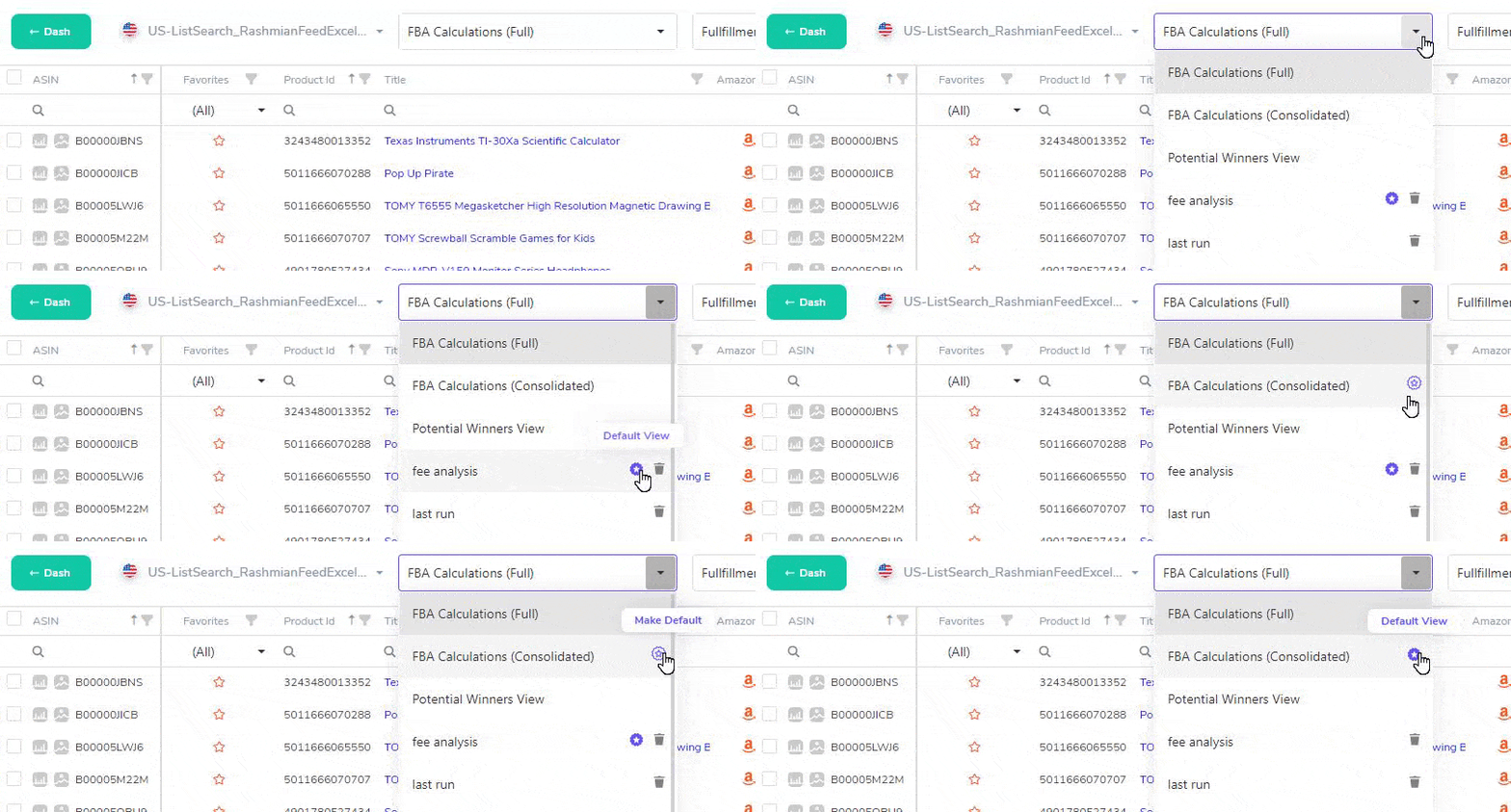
New feature has been added allowing you to select a default gridview! The default gridview will be used each time you load a new list. Enjoy!
Hope you enjoy the update! Please be sure to visit, subscribe and share our Facebook, YouTube & new Twitter page to be the first to get the latest updates on program developments and new features!
This video walks you through how to use the Reviews & Amazon Data feature to show Amazon Seller, # of Reviews and Ratings for the stage.analyzer.tools Windows application.
Amazon Seller, Reviews & Ratings Explained
In short, these columns are unique as they require a secondary process to show the data.
Process your spreadsheet normally
Filter the result for Profit, ROI, Sales Rank, Etc. to narrow the result to the few potential products you would consider purchasing. Effective filtering typically results in a very short list of products that meet criteria
Click the checkbox in the top left column to select-all products or select individual products you want to check for Amazon Seller and Reviews/Ratings. Click the Show Reviews & Amazon Data button at top of page to process.
New update for stage.analyzer.tools web application launches today boosting file processing speeds to ~180,000 products processed per hour, 10 times faster! Check out the video for more information.
Hope you enjoy the update! Please be sure to visit, subscribe and share our Facebook, YouTube & new Twitter page to be the first to get the latest updates on program developments and new features!
New Web app update is live adding new data columns to your grid! Check out the video for more information as well as the full update list below. Enjoy!
Update List:
NEW: data columns now available: Brand, Manufacturer, Model, BuyBox Contention, Parent ASIN & Part Number,
NEW: Text tool-tips for long text now only show up when text exceeds available viewing space,
FIXED: Email notification on file completion stopped working,
FIXED: Erroneous spreadsheet formatting warning.
Hope you enjoy the update! Please be sure to visit, subscribe and share our Facebook, YouTube & new Twitter page to be the first to get the latest updates on program developments and new features!
We are launching a new feature update to the stage.analyzer.tools web application in the next 24 hrs. Watch the video or see the update list below!
Update List:
NEW: Product Image hover icon,
NEW: Historical Chart hover icon,
FIX: UI issue with Gridview delete on small screens prevents deletion,
OTHER: Removed links to old UI interface. Hope you enjoy the update!
Hope you enjoy the update! Please be sure to visit, subscribe and share our Facebook, YouTube & new Twitter page to be the first to get the latest updates on program developments and new features!