Hope you enjoy the update! Please be sure to visit, subscribe and share our Facebook, YouTube & new Twitter page to be the first to get the latest updates on program developments and new features!
Amazon is transitioning all Amazon apps and sellers from its MWS Products API to its new Selling Partner API (SP-API), see detailed announcement. The MWS Products API, which is used by stage.analyzer.tools, will be deprecated by Amazon September 30th, 2022. As a result, stage.analyzer.tools has switched from MWS to SP-API as of September 6th 2022.
✔stage.analyzer.tools has been diligently preparing and is ready for the transition to SP-API
✔All major functionality has been retained + improvements added
✔ The conversion has been made seamless/invisible to most users
What action is required for stage.analyzer.tools users?
✔Existing Web app users do nothing. Everything is automatically handled in the background for you
?Existing Windows app users will need to update their app to version 3.0.2.8+ prior to September 31st. Failure to update the app will cause an error after September 31st. Updating the app is easy, simply click the Update button in the top right corner of the Dashboard tab inside the app.
What to do if you encounter issues?
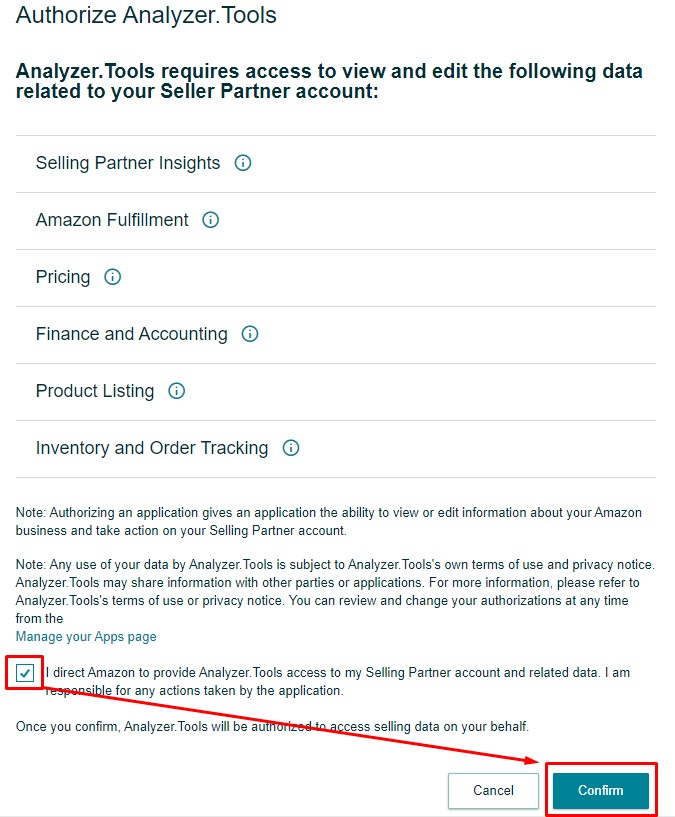
?Navigate to the Settings > API screen and reconnect your account within the app. The SP-API authorization process is simple, click Connect or Reconnect to login to your Amazon seller account and authenticate using the Amazon Authorization screen page.
(click to enlarge)
Still need more help?
No problem! We’re here to answer questions, simply reach out to support.
This video demonstrates how to use stage.analyzer.tools Browser Scan feature to reverse source new products and suppliers on Amazon. Explore Amazon’s full catalogue using your browser to source and analyze new wholesale products and suppliers. Commonly referred to as the ‘reverse sourcing method’ and used by the pros as one of the most effective sourcing strategies.
Intro (00:00)
Accessing Browser Search (00:16)
What is Browser Search (00:45)
Amazon Hunting (01:37)
Result Filtering & Analysis (03:27)
Winning Product Analysis (08:56)
Contacting the Brand (12:33)
Potential Profit Analysis (13:32)
Conclusion (16:00)
Hope you enjoy the update! Please be sure to visit, subscribe and share our Facebook, YouTube & new Twitter page to be the first to get the latest updates on program developments and new features!
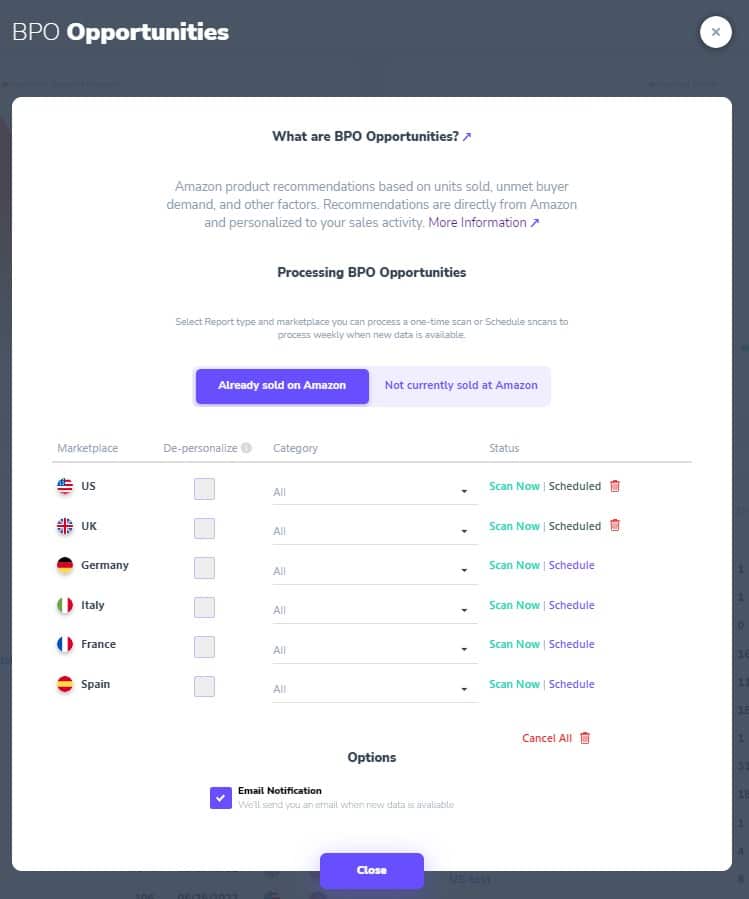
New update for the web app brings new features and functionality to Business Product Opportunity (BPO) scan as well as various bug fixes.
NEW (BPO)- New user interface for the BPO configuration screen,
NEW (BPO)- Added De-personalization as an option as well as Category selection,
NEW (BPO)- Added functionality to manage currently scheduled reports and schedules,
NEW- Added support for yearly subscription plans. Available for purchase/upgrade soon,
FIXED- Certain rare formatting was causing Spreadsheet loads to fail,
FIXED- Default marketplace was reverting to UK for some users,
FIXED- Favorite Date showing 01/01/1001 format,
FIXED- Storage fee update.
Hope you enjoy the update! Please be sure to visit, subscribe and share our Facebook, YouTube & new Twitter page to be the first to get the latest updates on program developments and new features!
New update is here for the stage.analyzer.tools Web app to help you source profitable products on Amazon more efficiently than ever! Check out the video demo and full list of changes below!
NEW- Competing Seller Search performance drastically improved. More results and much faster processing!
NEW- Product Variations now show reviews per variant in Product Details page. Helps determine which variants are selling the most/least,
NEW- Multi-Step Sort feature using Shift+ left click,
NEW- MWS Connection status now shows status for each marketplace,
NEW- Processing Settings screen now saves automatically, no need to click Save,
NEW- Unhide-all feature now has confirmation window to prevent accidental unhide,
FIXED- Refresh feature was not working,
FIXED- Data issue with Total # Offers in rare situations,
FIXED- Performance optimization for Favorite products and lists,
FIXED- Changed blank values to zeros for consistent filter functionality.
Click the links below to jump to the desired point in the video:
Hope you enjoy the update! Please be sure to visit, subscribe and share our Facebook, YouTube & new Twitter page to be the first to get the latest updates on program developments and new features!
Gridviews and filters are some of the most unique and powerful features of the app. Mastering these features will save many research hours and will help you become an efficient Amazon selling machine! The video below demonstrates how this is done in the web app.
\
Click the links below to jump to the desired point in the video:
Hope you enjoy the video! Please be sure to visit, subscribe and share our Facebook, YouTube & new Twitter page to be the first to get the latest updates on program developments and new features!
Happy new year analyzers! We just launched a new web app update with lots of fixes and new features including Column Chooser Drag & Drop and new Color column! Check out the video demo and full list of changes below!
NEW- Column Chooser Drag & Drop Functionality,
NEW- Color column now available in Column Chooser,
NEW- Consolidate 3 Package Dimensions columns into one column with L x W x H,
NEW- App alerts now link to source when clicked (post-update alerts only). New update alert type for article with pop-out modal for new releases,
FIXED- Process button not working in certain situations due to missing Default Marketplace selection for non-US marketplaces,
FIXED- Storage Fee updates for CA, UK and SE,
FIXED- Oversized Fee updates for UK, DE, FR, IT, SE, NE, PL,
FIXED- ASINs starting with 0 fee calculation issue,
FIXED- Fulfillment Subtotal not showing in native currency in certain situations,
FIXED- When Fulfillment is MFN, value in Fulfillment Subtotal cell is now shown as 0,
FIXED- Profit & Margin .01 cent rounding difference,
FIXED- BPO standard gridviews missing since last release,
FIXED- Product Details not loading if Package Quantity = null,
FIXED- Favorites modal re-appears after adding product to Favorites,
FIXED- Column Chooser now shows only relevant columns based on search type,
FIXED- Scientific Excel formatted files processing bug,
FIXED- Package Weight sorting issue.
Hope you enjoy the update! Please be sure to visit, subscribe and share our Facebook, YouTube & new Twitter page to be the first to get the latest updates on program developments and new features!
October update brings Restricted Brand Alert & Improved Multi-Pack Data + many other user experience and bug zapping improvements. Check out the video demo and full list of changes below!
NEW- Restricted Brands alert in grid,
NEW- Package Quantity crowdsourcing for more accurate multipack data,
NEW- Changes to values in Package Quantity, Sell Price, Purchase Price & VAT are now automatically saved in the grid,
NEW- Added hyperlinks for URLs in Excel export,
NEW- Marketplace selection at scan level allows changing Marketplaces without navigating to Settings screen,
NEW- Improved Drag n’ Drop functionality in Spreadsheet scan screen,
NEW- Improved formatting for Spreadsheet scan error log,
NEW- Added Export Excel File, Export AMZ File and Refresh List to right click menu option of Recent Lists,
FIXED- Logic for Product ID column mapping,
FIXED- Extra column data with more than 200 characters impacting number of results generated,
FIXED- Error when using Hide feature for large dataset,
FIXED- Error handling of duplicate columns in input spreadsheet
FIXED- Certain special characters in custom Gridview name were causing issues
FIXED- Many other small bugs
Hope you enjoy the update! Please be sure to visit, subscribe and share our Facebook, YouTube & new Twitter page to be the first to get the latest updates on program developments and new features!
New stage.analyzer.tools web app update adds new Amazon marketplace support for Netherlands, Sweden & Poland, adds new quality of life features and zaps bugs. Check it out in the video below.
NEW- Netherlands, Sweden & Poland marketplace support added to EU region
NEW- Highlight row on click
NEW- Large interactive Keepa chart now loads when clicking on Keepa hover icon
FIX- VAT currency symbol in grid header was not adjusting away from $
FIX- Profit hover calculation formatting was confusing for multi-packs
FIX- Multi-select add to favorites was taking too long to process
FIX- Search bar in grid was not working for number search
FIX- *.AMZ file export to Excel was not working
FIX- Many other small bugs
Hope you enjoy the update! Please be sure to visit, subscribe and share our Facebook, YouTube & new Twitter page to be the first to get the latest updates on program developments and new features!
New quality of life updates to the web app to make analyzing your Amazon lists even easier. Check it out in the video below.
NEW- Grid improvements with alternating row colors and column lines
NEW- Right click Copy feature in the grid allows easy copying of any cell
NEW- Less popup notifications, new green bar notification provides a better user experience
NEW- Deleting Recent Lists is now much faster, instant!
New- Many other small improvements
Hope you enjoy the update! Please be sure to visit, subscribe and share our Facebook, YouTube & new Twitter page to be the first to get the latest updates on program developments and new features!