How to Sell Wholesale Products on Amazon in 2025 (Full Guide)

Are you looking to start or scale an eCommerce business? Selling wholesale products on Amazon using Fulfillment by Amazon (FBA) presents an excellent opportunity for those seeking a reliable and scalable income stream. Whether you’re searching for a side hustle or looking to build a full-fledged business, leveraging Amazon’s infrastructure can help you succeed with minimal logistical hassle.

  • Amazon Wholesale FBA lets you sell branded products without building your own label.
  • Data-driven tools streamline bulk product research and sourcing for efficiency.
  • Profitability depends on picking in-demand, low-competition products and reliable wholesale suppliers.
  • Successful sellers analyze competition, avoid restricted brands, and use bulk analysis software.
  • Platform features like brand IP alerts, sales history, and detailed product metrics help minimize risk.

Selling wholesale on Amazon can be a scalable and profitable business model, especially when combined with the right tools to streamline sourcing, pricing, and inventory management. 15 Best Amazon Seller Tools for FBA in 2025 can help you maximize efficiency and profitability.

This guide will cover selling strategies, the advantages of Amazon Wholesale FBA, comparisons with other business models, and tips to help you source profitable wholesale products effectively.

What is Amazon Wholesale FBA?

Amazon Wholesale FBA involves purchasing branded products in bulk from distributors, suppliers, or manufacturers and reselling them as individual units at a profit. Unlike private labeling, wholesale selling eliminates the need to develop your own brand, making it a faster and less risky way to scale an Amazon business.

The Fulfillment by Amazon (FBA) model takes care of storage, packaging, and shipping, allowing sellers to focus on sourcing and scaling operations. Traditional wholesale businesses require renting warehouses and hiring staff to handle logistics, but Amazon FBA reduces upfront costs and operational headaches by shifting fulfillment responsibilities to Amazon.

Wholesale vs. Other Business Models

To make an informed decision, it’s essential to compare Amazon wholesale with other common selling strategies.

Wholesale vs. Retail Arbitrage

Retail arbitrage involves buying discounted products from retail stores and reselling them on Amazon at a higher price. While this method has a low barrier to entry, it requires continuous effort to source inventory manually.

Pros:

  • Low startup costs
  • Ideal for beginners
  • No minimum order quantities

Cons:

  • Time-consuming and hard to scale
  • Requires constant product hunting
  • High competition and risk of price fluctuations

Wholesale vs. Online Arbitrage

Online arbitrage follows the same concept as retail arbitrage but sources products from online retailers instead of physical stores.

Pros:

  • Work-from-home flexibility
  • Access to thousands of online stores

Cons:

  • Intense competition due to widely available deals
  • Difficulty in restocking the same profitable products

Related: 15 Best Amazon Seller Tools for FBA in 2025

Wholesale vs. Private Label

Private label selling involves creating your own brand by sourcing generic products from manufacturers and adding unique branding and packaging.

Pros:

  • Full control over branding and pricing
  • No competition on your listing
  • Potential for long-term brand growth

Cons:

  • High startup costs ($10k+ recommended)
  • Requires marketing investment
  • No guaranteed demand

Wholesale vs. Dropshipping

Dropshipping allows sellers to sell products without holding inventory, where suppliers ship items directly to customers.

Pros:

  • No inventory storage or handling required
  • Minimal upfront costs

Cons:

  • High risk of account suspension (violates Amazon’s policies if not done correctly)
  • No control over fulfillment speed and product quality
  • Limited profit margins

Selling Wholesale on Amazon

The wholesale business model combines the scalability of private label with the low risk of arbitrage. Instead of constantly hunting for deals, you can reorder profitable products in bulk, ensuring a stable and scalable income stream.

With wholesale selling, you can analyze past performance data to minimize risks. Using tools like stage.analyzer.tools, sellers can quickly assess sales trends, pricing history, competition, and profit margins before making a purchasing decision.

How stage.analyzer.tools Supports Large-Scale Amazon Wholesale Operations

Managing wholesale catalogs with thousands of SKUs can overwhelm even experienced Amazon sellers. stage.analyzer.tools stands out by scanning price lists in bulk and delivering instant profit calculations, sales history, competitive analysis, and even alternative feature comparisons with other tools. Features like deep scans, bulk data import, and customizable filters offer the flexibility and control needed for professional sourcing at scale. This is especially valuable for avoiding restricted brands on Amazon or quickly building a shortlist of the most profitable products. If you regularly deal with large supplier price sheets, stage.analyzer.tools dramatically cuts research time and improves your sourcing accuracy.

Steps to Start Selling Wholesale on Amazon

  1. Create an Amazon Seller account
  2. Find profitable wholesale products using data-driven sourcing tools
  3. Contact suppliers and open wholesale accounts
  4. Order and ship inventory to Amazon’s FBA warehouse
  5. Let Amazon handle fulfillment while you collect profits!

Best Wholesale Products to Sell on Amazon

Choosing the right products is critical to success. The goal is to find products with high demand and low competition. Instead of guessing, use bulk analysis software to filter through supplier catalogs and identify hidden gems quickly.

What to Look for in a Profitable Wholesale Product:

  • Consistent sales history – Avoid seasonal products unless planned strategically.
  • Lightweight and small – Lower shipping costs increase profitability.
  • No Amazon competition – Avoid listings where Amazon is a seller, as they dominate the BuyBox. For more information on identifying when Amazon is competing, see Amazon Restricted Brands: What You Can and Can’t Sell.
  • Healthy profit margins – Ensure profitable after all fees. To help with this, check out our Amazon FBA Fee and Profit Calculator to quickly run the numbers before you make an order.

Tips for Selling Wholesale on Amazon

  • Check if Amazon is a competing seller – Amazon prioritizes its own inventory in the BuyBox. Avoid products where Amazon holds significant stock.
  • Use competitive pricing strategies – Instead of undercutting competitors, price competitively while maintaining healthy margins.
  • Stick to smaller, lightweight products – This reduces FBA storage fees and shipping costs, maximizing profit margins.
  • Factor in all Amazon fees – Use a profit calculator like stage.analyzer.tools to ensure profitability before purchasing.
  • Avoid “Amazon supplier directories” – The best suppliers are not publicly listed; find them through trade shows, industry contacts, or direct outreach.
  • Follow Amazon’s Terms of Service – Failure to comply can result in account suspension. For more on staying compliant as a new seller, review the best free Amazon seller tools available.

Finding Wholesale Suppliers

1. Use Wholesale Trade Shows

Industry trade shows like ASD MarketWeek feature top suppliers. Even if you can’t attend in person, exhibitor lists can be valuable for supplier outreach.

2. Source by Competing Seller Storefronts

Use stage.analyzer.tools’ Storefront Search to analyze competitors’ inventory and identify brands they source from. Then, contact these brands to open wholesale accounts.

3. Reverse Sourcing on Amazon

Instead of searching for suppliers first, identify low-competition profitable products on Amazon, then trace them back to the manufacturers.

4. Subscribe to Trade Publications

Industry magazines and wholesale directories provide insight into upcoming trends and supplier contacts. You can supplement this with powerful Amazon product research tools to spot opportunities faster.

Final Thoughts

Selling wholesale products on Amazon via FBA is a scalable, low-risk business model that offers long-term growth opportunities. Unlike arbitrage, it allows repeatable product sourcing, and compared to private label, it involves less upfront investment and risk.

To succeed, data-driven decision-making is key. Use powerful analytics tools like stage.analyzer.tools to quickly assess wholesale catalogs and make profitable sourcing decisions. By leveraging Amazon FBA’s logistics, focusing on high-demand, low-competition products, and working with reliable suppliers, you can build a profitable and sustainable business on the world’s largest eCommerce platform.

Ready to level up your Amazon wholesale business? Try stage.analyzer.tools for a smarter, faster approach to bulk product research and supplier catalog analysis. Its data-rich platform is purpose-built to help Amazon sellers find the right products faster and minimize risk—so you can focus on growth, not guesswork.

FAQ

How do I know if a wholesale product is allowed or restricted on Amazon?
Before purchasing inventory, always check for Amazon restricted brands and categories. stage.analyzer.tools has integrated alerts for known restricted brands to help you avoid compliance issues and protect your seller account.

What are the main benefits of using stage.analyzer.tools for wholesale Amazon sourcing?
stage.analyzer.tools is designed for high-volume sellers who want to quickly scan, analyze, and filter large supplier lists for the best opportunities. Its bulk spreadsheet scan, historical price charts, and brand IP alerts save time and help you confidently choose profitable products.

How does wholesale compare to retail and online arbitrage?
Wholesale is more scalable and less labor-intensive over time, since you can reorder from distributors rather than constantly search for deals. With the right FBA software and proper sourcing strategy, wholesale offers a stable, repeatable income stream and fewer logistical headaches than retail arbitrage.

Can stage.analyzer.tools help with bulk converting product codes like ASIN to UPC or EAN?
Yes, stage.analyzer.tools integrates seamlessly with bulk data workflows and works alongside utilities such as ASIN to UPC/EAN converter tools when you need to match supplier lists to Amazon catalog data efficiently.
15 Best Amazon Seller Tools for FBA in 2025

Amazon sellers operate in an increasingly competitive market. To get ahead, leveraging powerful seller tools isn’t optional—it’s essential. This guide details the 15 best Amazon seller tools, their benefits, pros and cons, comparisons, and essential insights. Additionally, you’ll learn how to choose the right tool for your business no matter what stage you’re at.

How to Choose the Best Amazon Seller Tool

  • Identify specific needs: Wholesale, arbitrage, advertising, or private labeling.
  • Consider business scale: Tools should accommodate business growth.
  • Budget wisely: Balance cost against functionality.
  • Ease of Use: Match tool complexity with your experience.
  • Support quality: Tools should offer robust support and resources.

Comparison: Top Amazon Seller Tools

ToolPrimary UsePricingEase of UseAnalytics DepthBest For
Analyzer ToolsWholesale AnalyticsAffordableEasyHighBulk Wholesale Sellers
KeepaPrice TrackingAffordableModerateHighHistorical Price Checks
Viral LaunchMarket IntelligencePremiumModerateHighProduct Launches
SellerAmp SASArbitrage AnalysisModerateEasyModerateRetail Arbitrage
Inventory LabInventory ManagementModerateEasyHighLarge Inventories
Jungle ScoutProduct ResearchPremiumEasyHighProduct Research
SellerAppPPC ManagementPremiumModerateHighAdvertising & Analytics
Helium 10Comprehensive SuitePremiumModerateHighComprehensive Analytics
Seller SnapAutomated RepricingPremiumEasyHighCompetitive Niches
SmartScoutCategory ResearchPremiumEasyHighMarket Research
FeedbackWhizFeedback ManagementModerateEasyModerateReputation Management
PerpetuaAdvertising ManagementPremiumModerateHighAd Campaign Optimization
AMZScoutCompetitor AnalysisAffordableEasyModerateBeginners
TeikametricsAdvertising AnalyticsPremiumModerateHighROI-focused Advertising
PixelfyURL ManagementAffordableEasyModerateMarketing & Tracking

1. Analyzer Tools

stage.analyzer.tools is a leading wholesale analytics platform designed specifically for bulk product analysis and intelligent sourcing.

15 Best Amazon Seller Tools For 2023

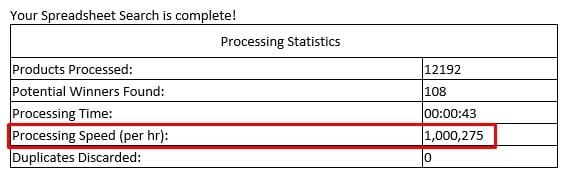
With unmatched speed (up to 1,000,000 products per hour), stage.analyzer.tools provides sellers with rapid insights, detailed historical sales data, and real-time IP alerts. Its intuitive and customizable grid view makes navigating large datasets seamless, significantly reducing time and effort during product selection.

  • Benefits: Increased profitability, significant time savings, superior competitive insights.
  • Pros: Fast and efficient processing, comprehensive analytics, affordable pricing structure.

Read more: Amazon Product Research: What It Is and Why It Matters

2. Keepa

Keepa excels at providing historical pricing and sales data crucial for making informed sourcing decisions. Sellers rely on Keepa’s easy-to-read graphs that clearly visualize market trends and pricing fluctuations over time, aiding strategic pricing and inventory management decisions.

  • Benefits: Reliable historical trend analysis, reduced risk in sourcing decisions.
  • Pros: Extensive and detailed historical data, straightforward visualization.
  • Cons: Potentially overwhelming interface for beginners.

For additional support when reviewing price history and brand restrictions, you can also refer to our guide on Amazon restricted brands.

3. Viral Launch

Viral Launch provides powerful tools for product discovery, market analysis, and listing optimization. Known for its accurate keyword recommendations and market intelligence, Viral Launch helps products gain maximum visibility and competitiveness from the start.

  • Benefits: Effective product launches, improved market penetration.
  • Pros: Strong analytics, effective keyword and optimization tools.
  • Cons: Higher cost may not suit smaller budgets.

If you’re a new seller, you may also benefit from our curated list of the best free tools for new Amazon sellers to jumpstart your journey on Amazon.

4. SellerAmp SAS

SellerAmp SAS is an invaluable tool for retail and online arbitrage sellers, offering immediate insights into profitability directly within browser windows or through its mobile app. SellerAmp’s quick, at-a-glance data helps sellers make confident, timely sourcing decisions.

  • Benefits: Real-time profitability, efficient sourcing decisions.
  • Pros: Mobile-friendly, user-friendly interface.
  • Cons: Limited capability for bulk analysis.

Managing product identifiers for arbitrage? Try our free ASIN to UPC/EAN converter for fast lookup and conversion needs.

5. Inventory Lab

Inventory Lab significantly streamlines the complexities of inventory management, financial tracking, and product listings, making it ideal for sellers managing large product catalogs. Its efficient barcode scanning integration accelerates the listing and inventory process.

  • Benefits: Accurate inventory management, streamlined financial tracking.
  • Pros: Easy integration, comprehensive reporting.
  • Cons: Less practical for small inventories.

6. Jungle Scout

Jungle Scout is highly recognized for robust product research and supplier verification. Sellers utilize its extensive database for reliable product trend forecasts, identifying profitable niches, and gaining supplier trustworthiness.

  • Benefits: Effective niche discovery, supplier reliability.
  • Pros: User-friendly, powerful analytics.
  • Cons: Relatively expensive subscription.

Discover more: Top Jungle Scout Alternatives

7. SellerApp

SellerApp integrates deep analytics with PPC campaign management, helping sellers optimize advertising spending and gain actionable market insights. It focuses on enhancing profitability through strategic marketing and optimization.

  • Benefits: Maximized advertising ROI, targeted market analytics.
  • Pros: Strong PPC functionality, detailed performance metrics.
  • Cons: Requires dedicated learning.

8. Helium 10

Helium 10 offers a broad suite of powerful tools for keyword research, product optimization, and profitability tracking. Its comprehensive toolset makes it versatile enough for all types of Amazon sellers, from beginners to established brands.

  • Benefits: Diverse solutions, broad applicability.
  • Pros: Comprehensive suite, scalability.
  • Cons: Complexity for newcomers.

For additional strategies on powering up your keyword research, refer to our article on free keyword tools for Amazon listings.

9. Seller Snap

Seller Snap offers AI-driven pricing optimization, automating price adjustments to maintain competitiveness without sacrificing profit margins. It’s highly effective for sellers in competitive niches requiring real-time repricing.

  • Benefits: Improved profitability, reduced manual effort.
  • Pros: Exceptional AI-driven automation.
  • Cons: Premium pricing.

10. SmartScout

SmartScout provides a powerful way to explore Amazon’s marketplace through brand, seller, and product intelligence. Its visual “seller map” and category explorer reveal how brands compete, what products drive traffic, and where new opportunities exist. It’s especially useful for wholesale and agency sellers looking to analyze competitors and uncover hidden product gaps.

  • Benefits: Unique insights into market share, brand reach, and cross-seller relationships.
  • Pros: Unique seller and brand mapping, high data accuracy, and intuitive navigation.
  • Cons: Wholesale plan has limited scan volume; some advanced analytics require higher-tier subscriptions.

11. FeedbackWhiz

FeedbackWhiz streamlines customer feedback management, automating the collection of reviews to improve brand reputation and foster customer loyalty. It simplifies feedback monitoring and timely responses.

  • Benefits: Stronger brand trust, efficient feedback management.
  • Pros: Automated review generation and response tools.
  • Cons: Specialized solely in feedback management.

12. Perpetua

Perpetua effectively manages Amazon advertising through AI-driven analytics, optimizing ad campaigns for maximum return on investment. Ideal for sellers looking to improve campaign effectiveness significantly.

  • Benefits: Optimized ad performance, higher profitability.
  • Pros: Excellent ad management, powerful analytics.
  • Cons: May require learning for maximum benefit.

13. AMZScout

AMZScout offers accessible, intuitive tools for product research and competitor analysis. Its simplicity makes it an excellent starting point for new sellers or smaller-scale Amazon businesses.

  • Benefits: Accessible market research, intuitive use.
  • Pros: Beginner-friendly design.
  • Cons: Limited advanced options.

Explore further: AMZScout vs. stage.analyzer.tools

Doing Bulk Amazon Product Research Faster

Speed is essential for wholesale and arbitrage sellers dealing with extensive supplier catalogs. Not every software is purpose-built for quick, accurate Amazon bulk analysis. Advanced tools like stage.analyzer.tools allow you to upload, scan, and filter massive product lists at scale, helping you uncover profitable items faster than manual checks or lighter browser extensions. If you’re still relying on slow, manual spreadsheets for FBA profitability, consider exploring purpose-built bulk Amazon product research tools to maximize your efficiency and minimize sourcing errors.

How to Choose the Best Amazon Seller Tool

When selecting the best Amazon seller tool, it’s essential to first identify your specific business needs, whether that’s wholesale, arbitrage, advertising, or private labeling. Additionally, consider the scale of your business and choose tools that can support your growth over time.

Budget wisely by balancing cost against the functionality and value each tool offers. Also, match the complexity of the tool to your experience level to avoid unnecessary frustration or learning curves. Finally, ensure that the tool you choose provides robust support, training, and resources to help you maximize its capabilities.

Tips for Integrating Multiple Amazon Seller Tools

To maximize the efficiency of your Amazon business, integrating multiple seller tools effectively is crucial. Here are some strategies to make the most out of your tools without redundancy or unnecessary expenses:

  1. Define Your Primary Needs – Before subscribing to multiple tools, outline your core requirements, such as product research, keyword optimization, repricing, or inventory management. Choose tools that excel in these areas instead of overlapping functionalities.
  2. Use a Combination of Free and Paid Tools – Some free tools provide valuable insights, such as Amazon’s own Seller Central analytics. Complement these with paid tools for more in-depth analysis and automation. Check out Top Free Amazon Product Research Tools to see which ones can supplement your strategy.
  3. Avoid Redundancy – Many seller tools offer similar features. Compare capabilities before committing to multiple subscriptions to ensure you’re not paying for the same functions across different platforms.
  4. Leverage API Integrations – Some advanced tools, such as Helium 10 and SellerApp, integrate with other platforms to automate workflows. If you’re scaling, prioritize tools that offer API access or seamless connections with your existing tech stack.
  5. Schedule Regular Data Reviews – Ensure that the insights from each tool are being utilized effectively. If a tool isn’t providing actionable insights, reconsider its necessity.
  6. Prioritize Ease of Use & Support – While feature-rich tools can be tempting, they can also be complex. Select tools that offer robust support, training, and an intuitive user interface.

Frequently Asked Questions (FAQs)

What are Amazon Seller Tools?

Amazon seller tools are third-party applications designed to assist with tasks like product research, inventory management, pricing optimization, advertising, and review generation. These tools help sellers streamline operations and maximize profitability.

Do I need to use seller tools to succeed on Amazon?

While you can sell on Amazon without third-party tools, leveraging them can significantly improve efficiency, save time, and provide insights that enhance decision-making.

What is the best Amazon seller tool for beginners?

Beginners should start with tools that offer free or budget-friendly options, such as Keepa for price tracking and AMZScout for basic product research. As your business grows, you can integrate more advanced tools like stage.analyzer.tools or Helium 10.

What’s the difference between free and paid Amazon tools?

Free tools typically offer limited functionality, while paid tools provide more in-depth data, automation, and scalability. Some freemium tools allow users to access essential features but require a subscription for full capabilities.

How do I choose the best seller tool for my business?

Consider your business model (wholesale, private label, arbitrage), budget, and required features. Tools like stage.analyzer.tools are ideal for wholesale sellers, while Viral Launch and Jungle Scout are best for private-label sellers.

Can I use multiple seller tools together?

Yes, many sellers use a combination of tools for different aspects of their business. For example, stage.analyzer.tools for bulk product analysis, Keepa for price history tracking, and SellerAmp for quick profitability insights.

Which Amazon tool is best for keyword research?

Helium 10 and SellerApp provide comprehensive keyword research and optimization features to improve product visibility on Amazon.

Final Thoughts

Choosing the right Amazon seller tools can be the difference between struggling to keep up and dominating your niche. The right tools not only streamline your workflow but also provide critical insights that drive profitability, efficiency, and long-term growth. Whether you’re a wholesale seller, private label brand, or retail arbitrage expert, investing in tools that enhance market research, pricing strategies, and operational efficiency will give you a competitive edge in 2025 and beyond.

Instead of subscribing to multiple tools blindly, focus on solutions that save time, reduce risk, and provide actionable data. A tool like stage.analyzer.tools can help wholesale sellers analyze bulk product lists at unmatched speeds, while platforms like Helium 10 and Jungle Scout cater to private label sellers looking for keyword research and listing optimization.

If you’re looking to maximize your productivity and source profitable products faster, try stage.analyzer.tools—the preferred research platform for professional Amazon sellers. Upload bulk price lists, get rapid profit insights, and leverage marketplace data that helps you stay ahead of trends and risk. Explore the tool and see how it can be a game-changer for your Amazon wholesale strategy.

Explained- Blank Profit/ROI, Sell Price & Offer Cells

Blank Profit/ROI, Sell Price & Offer Cells

? Have you noticed an increase in blank Profit/ROI, Sell Price & Offer cells in the app?

? Amazon has made changes to the way they report data which has been very confusing and the video below will hopefully alleviate the confusion.


Hope this helps!  Please be sure to visit, subscribe and share our Facebook, YouTube & Twitter page to be the first to get the latest news and updates on program developments and new features!

Amazon Small and Light is Changing to Low-Price FBA: What You Need to Know

How to Adapt to Amazon’s Low-Price FBA Program: A Guide for Sellers

Amazon announced it will replace its Small and Light FBA program with a new Low-Price FBA program in all regions. This change will affect sellers who offer low-cost products that meet certain weight and size requirements. In this article, we will explain what the Low-Price FBA program is, how it differs from the Small and Light program, and what are the pros and cons of this change for sellers.

What is Low-Price FBA and how is it different from Small and Light?

Low-Price FBA is a new fulfillment option that offers reduced FBA fees for ASINs priced under a certain threshold. The price threshold varies by marketplace, see Fact list below. Unlike Small and Light, which had a separate fulfillment network and slower shipping speeds, Low-Price FBA will use the same fulfillment centers and offer the same fast delivery as standard FBA. This means that your low-priced products will be eligible for Prime benefits and faster  shipping for all customers.

To qualify for Low-Price FBA your products simply needs to price under the threshold and be eligible for FBA. Amazon will automatically apply Low-Price FBA rates. No action is required!

What are the pros and cons of Low-Price FBA?

The main advantage of Low-Price FBA is that it can help you improve your margins and competitiveness on low-cost products. By offering faster and free shipping to your customers, you can increase your sales and conversions. You can also save on fulfillment costs, as Low-Price FBA fees are lower than standard FBA fees.

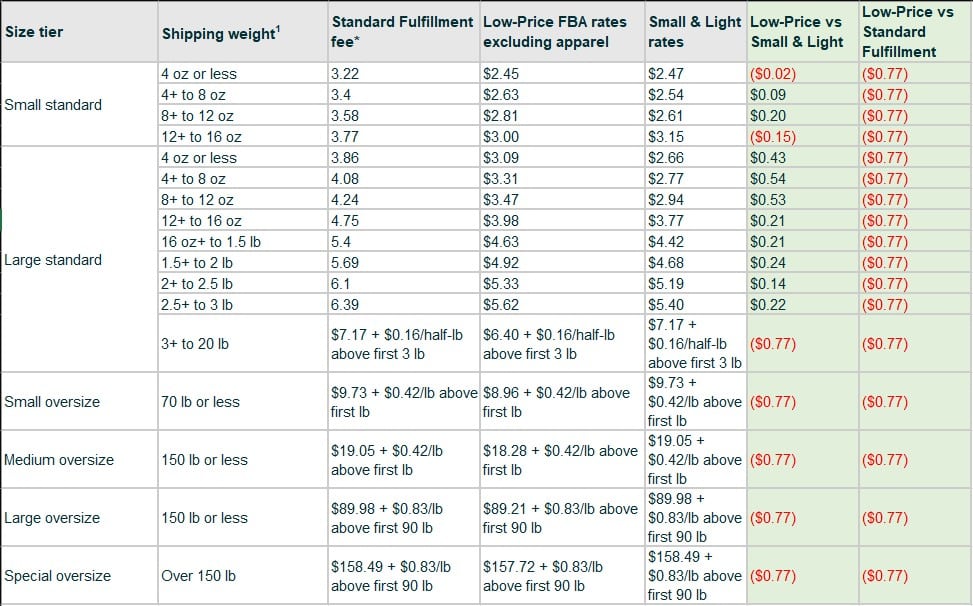
For example, according to Amazon’s fee chart comparison below, Low-Price FBA rates have significantly reduced fulfillment fees when compared to Standard FBA with a $0.77 savings across the board

When comparing to Small and Light, the biggest advantage to Low-Price FBA is the automatic enrollment for eligible products. No more product by product enrollment which was necessary with Small and Light!

The main drawback of Low-Price FBA vs Small and Light is the price threshold for eligibility is $2 lower for the US marketplace vs Small & Light. Further, the fulfillment discount is lower, on average, which means certain products that were enrolled in Small and Light will will see increase in fulfillment cost.

Low-Price FBA Fact List

  • Small and Light (S&L) FBA Fulfillment discount program is being replaced by Low-Price FBA
  • Small and Light rates continue to apply until the program expires on August 29, 2023 in US and September 26, 2023 for EU marketplaces.
  • Enrollment of new Small and Light ends after July 17th, 2023 in US and September 14, 2023 for EU.
  • Low-Price FBA applies automatically for all items priced below:
    • $10 in US (reduction from $12 vs. S&L)
    • £10 in the UK*,
    • €11 in Germany*,
    • €12 in France, Italy, Spain and the Netherlands*,
    • SEK 140 in Sweden*,
    • PLN 55 in Poland*.

*EU Price thresholds shown including VAT and remain unchanged vs S&L.

  • Small and Light used slower shipping speeds than standard FBA and Low-Price FBA will ship at standard (faster) FBA speeds
  • Low-Price FBA eligibility is automatic & rates & won’t be subject to 2023 holiday peak fulfillment fees (October 15, 2023, through January 14, 2024).
  • Low-Price FBA rates will be an average of $0.77 lower per item than the current FBA rates for these products in the US.
  • If your products were enrolled in Small and Light and are priced below $10, this change will mean that you will pay about $0.22 more per item than with Small and Light, but your items will now ship with the faster FBA fulfillment speeds.
  • If your products were not enrolled in Small and Light and are priced below $10, this change will mean that you will pay about $0.77 less per item while continuing to enjoy the fast FBA fulfillment speeds you have been receiving.

Compare Low-Price vs Small & Light vs Standard FBA Fees

How do Low-Price FBA fees compare to the previous Small & Light program. How do Low-Price FBA fees compare to standard FBA fulfillment?

United States (US) FBA Fee comparison

In the US marketplace, Low-Price FBA rates have significantly reduced fulfillment fees when compared to Standard FBA with a $0.77 savings across the board. When comparing Low Price FBA fees vs Small & Light, results vary with standard size tiers seeing an average cost cost increase of $0.22 using Low Cost FBA.

The Large standard size tiers between 4oz – 12oz see the largest disadvantage for Low-Price FBA vs Small & Light with a cost increase of up to $0.54.

Fee Comparison- Us

1Shipping weight is calculated based on the item’s unit weight or dimensional weight.

* Most products (non-dangerous goods, non-apparel)

Source-https://sellercentral.amazon.com/help/hub/reference/GJTAVU7P2W2VE8Q9

United Kingdom (UK) FBA Fee comparison

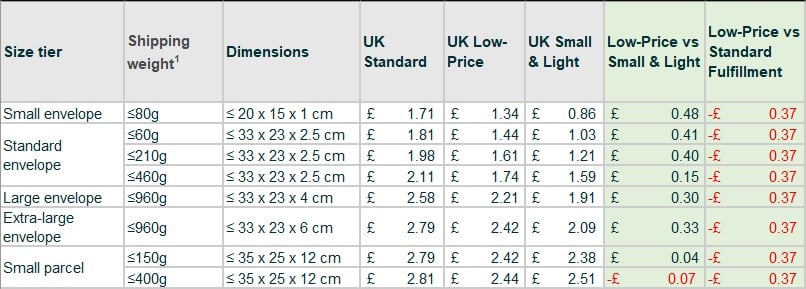
In the UK marketplace, Low-Price FBA rates provide a moderate reduction in fulfillment fees when compared to Standard FBA with a £0.37 savings across the board. When comparing Low Price FBA fees vs Small & Light, fees are on average £0.22 less with Small & Light.

Small envelope standard size tier with ≤80g shipping weight has the largest disadvantage for Low-Price FBA vs Small & Light with a cost increase of £0.48.

Uk Comparison

Germany (DE) FBA Fee comparison

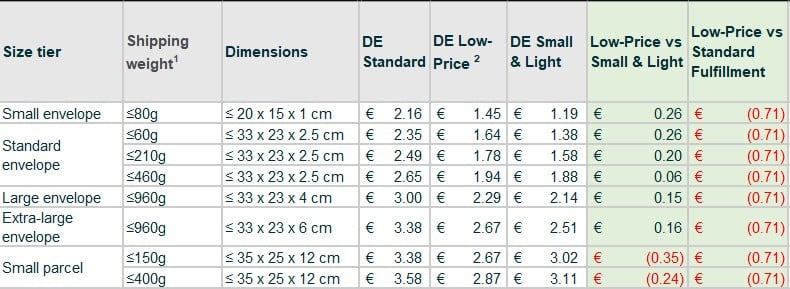
In the DE marketplace, Low-Price FBA rates provide significantly reduced fulfillment fees when compared to Standard FBA with a €0.71 savings across the board. When comparing Low Price FBA fees vs Small & Light, results are mixed with Low-Price FBA €0.18 more expensive on average in the envelope size tiers and up to €0.35 less expensive in Small Parcel.

De Comparison

France (FR) FBA Fee comparison

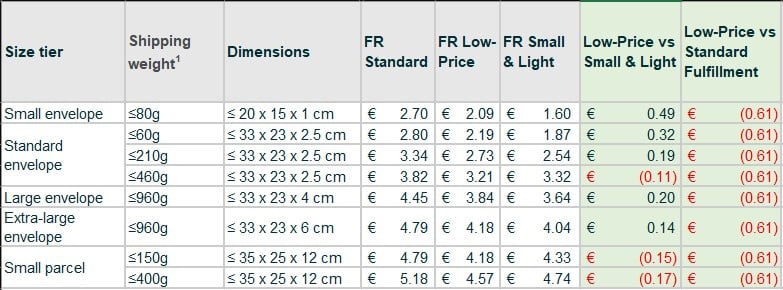
In the France marketplace, Low-Price FBA rates provide significantly reduced fulfillment fees when compared to Standard FBA with a €0.61 savings across the board. When comparing Low Price FBA fees vs Small & Light, results are mixed with Low-Price FBA €0.21 more expensive on average in the envelope size tiers and up to €0.17 less expensive in Small Parcel.

Fr Comparison

Spain (ES) FBA Fee comparison

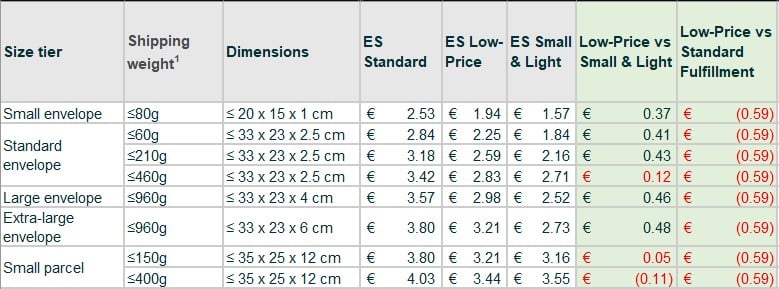
In the Spain marketplace, Low-Price FBA rates provide significantly reduced fulfillment fees when compared to Standard FBA with a €0.59 savings across the board. When comparing Low Price FBA fees vs Small & Light, results are mixed with Low-Price FBA €0.38 more expensive on average in the envelope size tiers and up to €0.11 less expensive in Small Parcel.

Es Comparison

Italy (IT) FBA Fee comparison

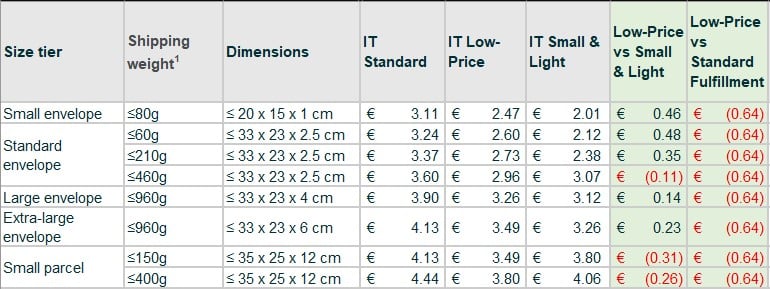
In the Italy marketplace, Low-Price FBA rates provide significantly reduced fulfillment fees when compared to Standard FBA with a €0.64 savings across the board. When comparing Low Price FBA fees vs Small & Light, results are mixed with Low-Price FBA €0.26 more expensive on average in the envelope size tiers and up to €0.31 less expensive in Small Parcel.

It Comparison

1 Shipping weight is calculated based on the item’s unit weight. Learn how to determine your product’s shipping weight.

2 The fees will differ if you have FBA inventory in Germany and do not participate in the Fulfillment Network Expansion, authorizing Amazon to store and process German FBA inventory in our fulfillment network, including Poland and the Czech Republic. You are charged an additional fulfillment fee of £0.26 for the UK, €0.26 for Germany, €0.27 for France, Spain, Italy and the Netherlands (inclusive of the Digital Sales Tax for France), SEK 2.50 for Sweden or PLN 1.15 for Poland, per FBA unit shipped from German fulfillment centers for both standard FBA and low-priced FBA items.

Source-https://sellercentral-europe.amazon.com/help/hub/reference/GJTAVU7P2W2VE8Q9


Hope this helps!  Please be sure to visit, subscribe and share our Facebook, YouTube & Twitter page to be the first to get the latest news and updates on program developments and new features!

Web App Update- Small & Light Support + Auto S&L Profit Calculations

stage.analyzer.tools adds Small & Light Support for Amazon FBA Sellers

*UPDATE* – Amazon Small and Light is Discontinued and Changing to Low-Price FBA: What You Need to Know

stage.analyzer.tools adds Amazon Small & Light support including automatic S&L Profit calculation, check out the video to see how it works!

The Amazon Small and Light program reduces FBA fees for products which meet a certain criteria, read more. This discount allows Amazon FBA sellers to offer small & light products at an affordable price to customers using the FBA fulfillment method.  In simple terms, offering low cost & lightweight products can finally be profitable using FBA!

  • Introduction (00:00)
  • What is Small & Light (00:12)
  • How it works in the app (0:48)
  • S&L Profit impact example (02:27)
  • Conclusion (03:46)

Amazon Small & Light Criteria

stage.analyzer.tools takes care of the hard work and let’s you know if a product is eligible automatically!

In order to be eligible for Amazon’s Small & Light program in the US, products need to meet the criteria below (other regions will vary).

✔ Measure 18 length x 14 width x 8 height or less in inches

✔ Shipping Weight should be 3 lb. or less

✔ Priced $12 or less

✔ The product types below are not eligible

  • Restricted products
  • FBA prohibited products
  • Adult products
  • Dangerous goods identification guide (hazmat)
  • Temperature-sensitive products (such as chocolates).

Amazon S&L Availability by Country

The S&L program is supported in all North American & EU + UK Amazon marketplaces with the exception of-

❌Canada

❌Mexico

It’s not clear why Amazon has chosen not to support Canada and Mexico with the Small & Light program.  However, we will monitor Amazon for changes and add support if and when Amazon allows it.

Enrolling ASINs into FBA Small & Light

Seller needs to apply eligible ASINs for the Small & Light Program in order to obtain the FBA fee discount. See Amazon’s full step by step Enrollment Guide.

? Log in to Seller Central

? Access the Small & Light program Enrollment Page

? Download & update the enrollment template

  • Copy and paste MSKUs into the yellow Upload tab, starting in cell A4 (paste as Text).
    Remove extra spaces before and after your MSKUs to prevent upload errors.
  • Ensure cell B1 accurately reflects the appropriate marketplace.

? Save and Upload Your MSKUs Into Seller Central

  • Save the Upload tab as a Text (tab delimited) file.
  • Click the Browse button on the enrollment page and select your newly created Text (tab delimited) file.
  • Click the Upload Now button.

? Review Upload Status for any errors

? Ship Your Items to IVSA

  • Create inbound shipments for MSKUs that were successfully enrolled into the Small
    and Light Program.

Thank you for choosing stage.analyzer.tools as your go-to tool for Amazon product research and analysis and stay tuned for more updates soon ?.

Hope you enjoy the update!  Please be sure to visit, subscribe and share our Facebook, YouTube & Twitter page to be the first to get the latest updates on program developments and new features!

Web app Update- Processing Speed 5x Faster. Up to 1,000,000 products/hr!

Announcing- Major boost to web app processing speeds

? Spreadsheet Search speeds boosted from 200k products/hr to up to 1,000,000/hr ?

Speed

⚡ That means your 15,000 product wholesale list can now be processed in under a minute!

We understand time is money in the Amazon marketplace and we’re committed to providing you with the best tools to help you succeed. With this new update, you can now process your wholesale catalogue 5x+ faster and more efficiently than any app on the market!

Thank you for choosing stage.analyzer.tools as your go-to tool for Amazon product research and analysis and stay tuned for more updates soon ?.

Hope you enjoy the update!  Please be sure to visit, subscribe and share our Facebook, YouTube & Twitter page to be the first to get the latest updates on program developments and new features!

Web app Update- Improved Est Sales, Filterable Brand Restrictions, ASIN conversions, More!

5.4.23

New web app update has launched, yay! We focused this update on your feedback so please keep the suggestions coming and stay tuned for more exciting updates coming soon ?.

New Features-

  • Updated Estimated Sales data for more accurate sales estimates (00:14)
  • Hover tool-tip on long product name titles (00:24)
  • ‘Is Top Level Category’ data has been improved and is now available to all users. This column was previously available to Pro tier only. (00:41)
  • UPC, EAN & ISBN is now reported on ASIN scans (01:03)
  • Brand Restriction is now filterable in the grid (01:26)
  • Up to 6 Additional Columns are now allowed, previous limit was 4 columns (01:47)

Bug Fixes-

  • Product Detail Pages charts and Review % was not loading reliably
  • Additional Columns not appending to Full Data & Potential Winner Views
  • Cost missing on “Not Found on Amazon” results
  • Certain Historical Data was not populating reliably

Hope you enjoy the update!  Please be sure to visit, subscribe and share our Facebook, YouTube & new Twitter page to be the first to get the latest updates on program developments and new features!

Web app Update- Hazmat Support, Faster Product Detail Pages

11.30.22

Happy holidays, the Analyzer elves have been busy! New updates launched today include:

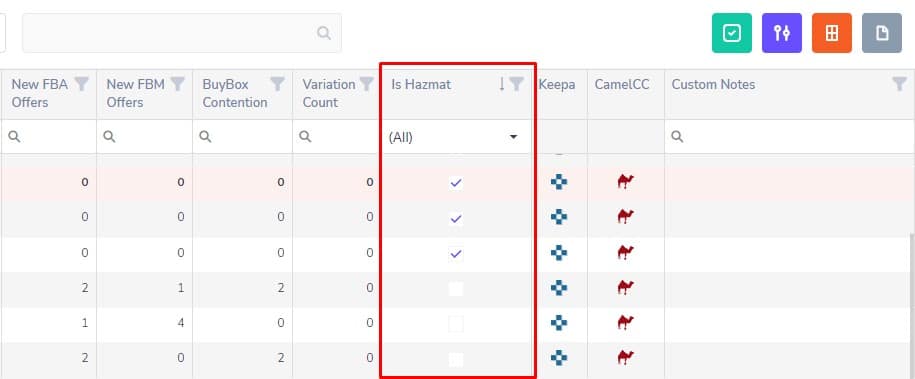
✔ Hazmat Support- New data grid column ‘Is Hazmat’ let’s you know if an Amazon product is classified as ‘Hazardous materials’. These products may have additional requirements to sell on Amazon and should prompt additional scrutiny before making a large supplier purchase. The Is Hazmat column has been added to all standard grid views.

Screenshot 8

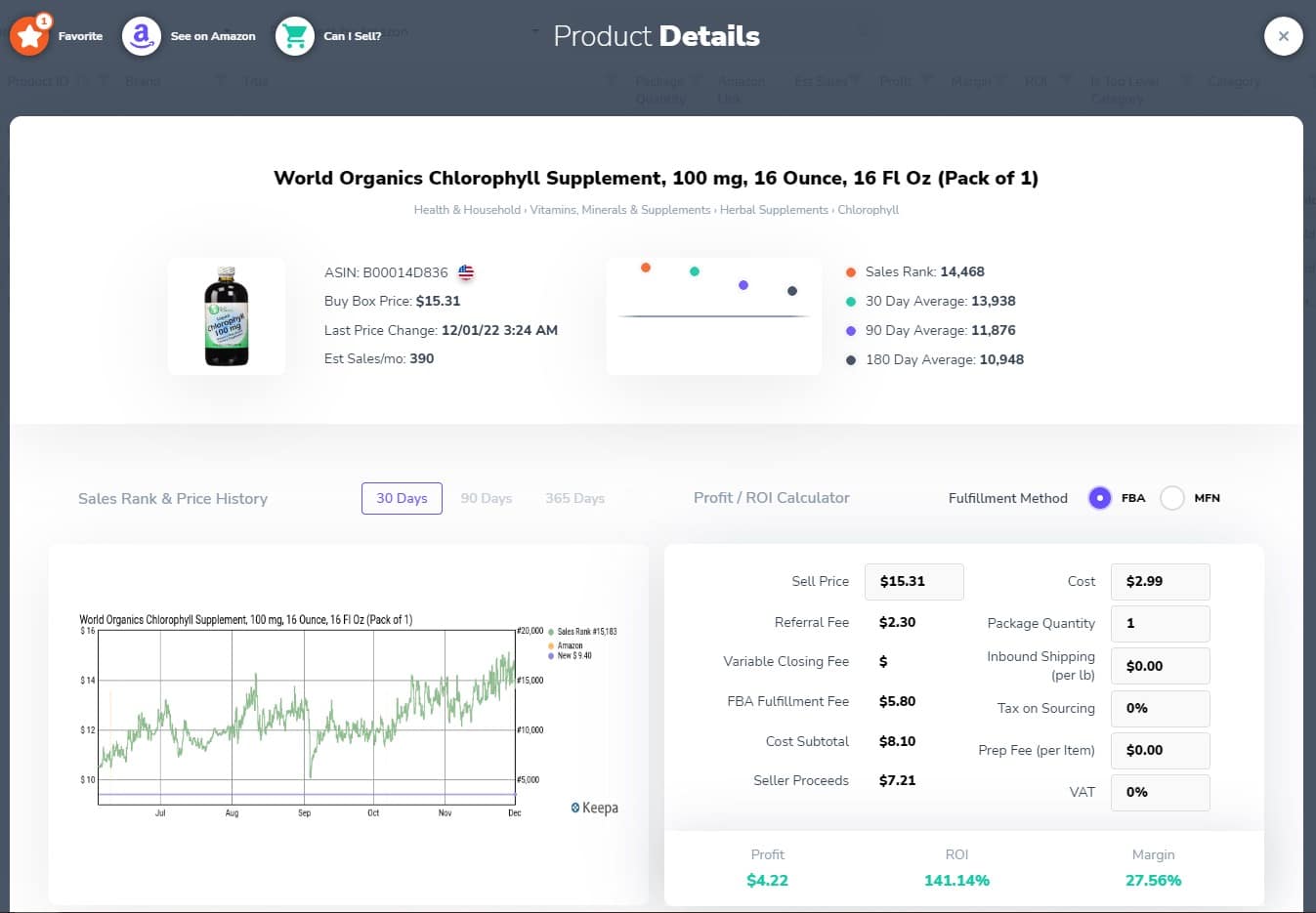
✔ Product Detail Pages- have been optimized and load much faster! What used to take up to 8 seconds to load now takes 1-2 seconds. You can access Product Detail pages by clicking on the product name in the Title column of the grid. This is a sign of things to come as we shift our development focus to massively improving performance.

Screenshot 9

✔ Various small fixes and quality of life improvements.

?Hope you enjoy the update!  Please be sure to visit, subscribe and share our Facebook, YouTube & new Twitter page to be the first to get the latest updates on program developments and new features!