
AI Title Search: Find Amazon Products Without UPC/EANs or ASINs
No UPCs? No Problem! AI Title Search finds matching Amazon listings using product titles and descriptions instead of traditional identifiers like UPC/EAN, ISBN or ASINs.
It’s ideal for Amazon wholesale sellers working with supplier spreadsheets that lack these standard product identifiers. Analyze thousands of products in bulk instead of searching Amazon manually.
Upload a supplier spreadsheet and AI Title Search matches each product title to an Amazon listing, then scores every match. In our tests, descriptive titles reach up to 95% match accuracy.
Table of Contents
How to Run an AI Title Search
- Start with the spreadsheet your supplier sent you, with one product per row. A descriptive title column gives the best matches.
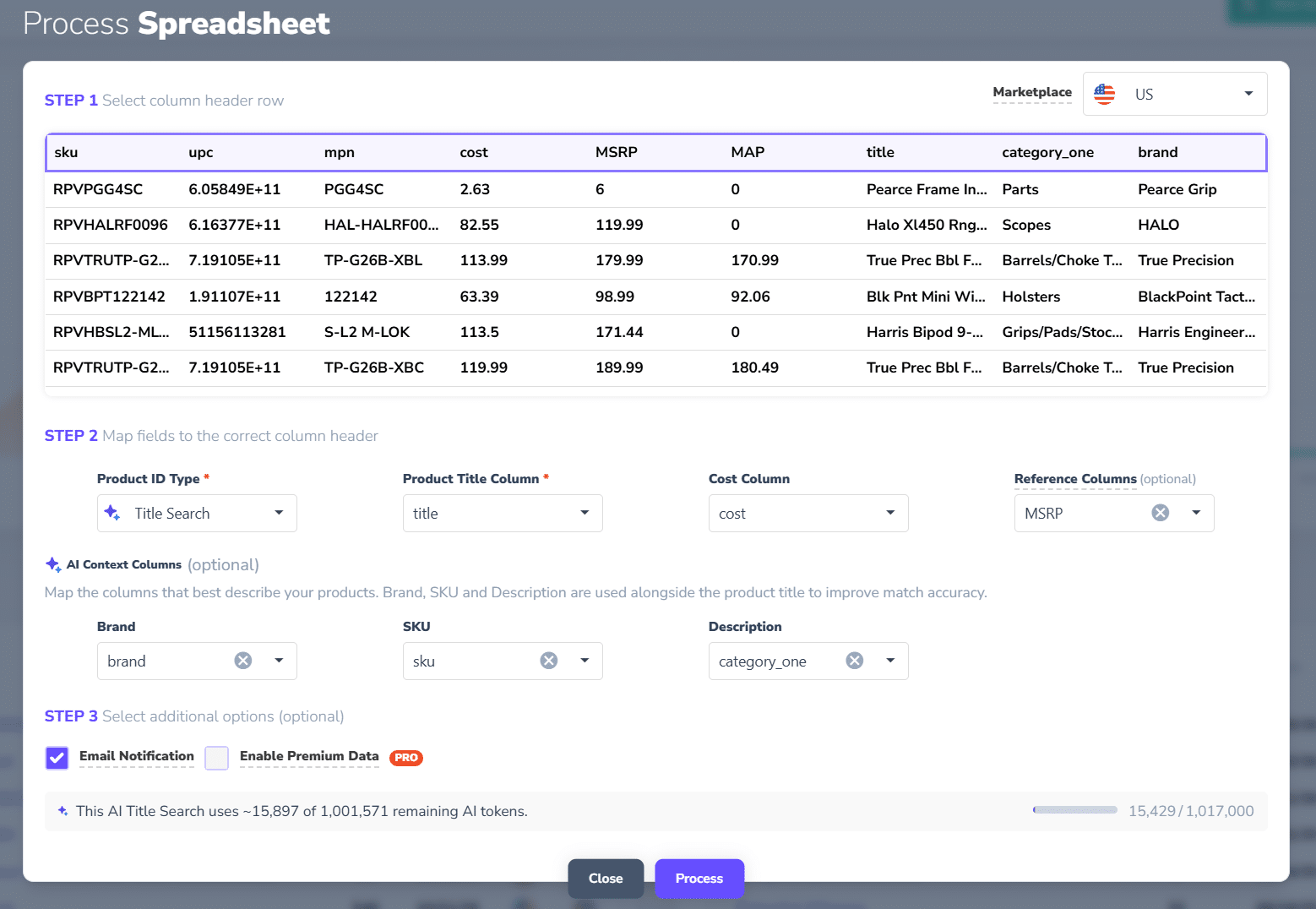
- Upload the spreadsheet and select Title Search for Product ID Type.
- Select your Product Title Column and Cost Column. Add Brand, SKU, and Description columns under AI Context Columns, if you have them. Good context columns can dramatically improve match accuracy!
- Click Process. Each row uses 1 AI Token.
Have UPCs, EANs, ISBNs, or ASINs?
If your supplier spreadsheet already contains product identifiers, you can use our traditional Spreadsheet Scan to quickly find and analyze thousands of Amazon products without AI Title Search.
Learn how to search Amazon using UPCs, EANs, ISBNs, or ASINs →
Best Practices for Accurate Matching
Use descriptive product titles. If you can’t identify the specific product based on your title, the AI can’t either.
- Poor: “Black Markers”
- Better: “Sharpie Fine Point Permanent Markers Black 12 Pack”
Provide additional AI Context. Map relevant spreadsheet columns such as brand, manufacturer part number (MPN), descriptions, when available to improve matching accuracy.
Verify before purchasing. Similar products may have different ASINs depending on size, color, or pack quantity. Always verify matches before purchasing inventory.
Start with a small scan. Test a sample of your supplier catalog to evaluate matching accuracy before processing thousands of products.
Free AI Tokens and Pricing
Each product row analyzed uses 1 AI Token.
Web App subscriptions include free AI tokens that renew each period:
| Subscription Plan | Billing Frequency | Free AI Tokens |
|---|---|---|
| Web App | Monthly | 1,000/mo. |
| Web App Pro | Monthly | 2,000/mo. |
| Web App | Yearly | 15,000/yr. |
| Web App Pro | Yearly | 25,000/yr. |
- Free AI Tokens: Replenished at each subscription renewal. Unused tokens expire and do not roll over.
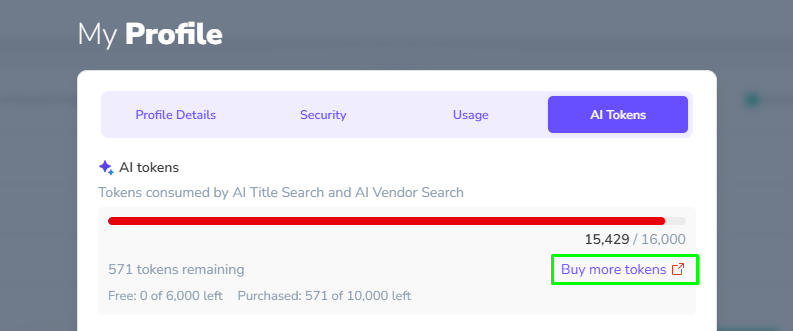
- Purchased AI Tokens: Available directly in the stage.analyzer.tools app and never expire. Visit My Profile > AI Tokens.
Ready to try it? See plans and free AI tokens.
Understanding AI Confidence
AI Title Search assigns a confidence score (0–100) indicating how closely a supplier product matches an Amazon listing.
| Score | Classification |
|---|---|
| 95–100 | Strong match |
| 80–94 | Likely match |
| 60–79 | Needs review |
| Below 60 | Unlikely |
| No Score | Not found on Amazon |
Use the AI Confidence filter to prioritize your results.
Important: AI matches are not guaranteed to be accurate. Always verify product details, particularly variations and pack quantities, before purchasing inventory.
Tips for Better Matching Accuracy
- Use full and descriptive titles. Include brand, model, size, color, and quantity whenever possible.
- Map additional context columns. Brand, MPN, and product descriptions help improve matching.
- Check product variations. Similar products may differ in size, color, or configuration.
- Start with a small scan. Test your supplier data before processing thousands of rows.
What to Do After Matching
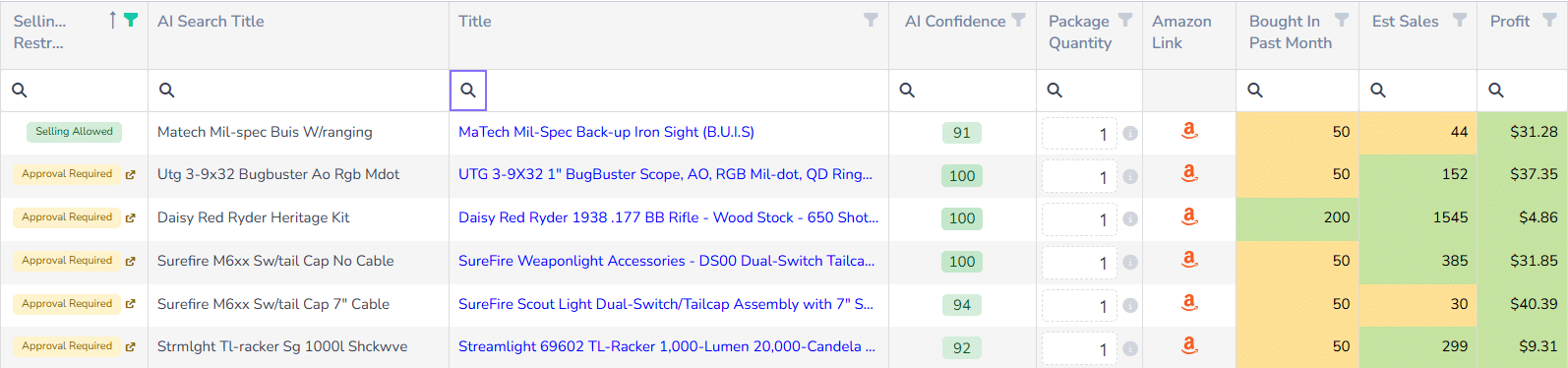
Once your products are matched, filter the results by AI Confidence score, your desired Profit and demand signals such as Bought in Past Month or Est Sales. You can add more filters to narrow further, if needed. Then review the filtered results:
- Process and filter the Selling Restrictions column on remaining results to identify products you can sell now without approval.
- Confirm the product match is correct by comparing the product image, title and other details.
- Review and correct Package Quantity for multi-packs, if necessary.
- Review the Product Details page and remaining details closely before purchase.
Frequently Asked Questions
Do I need UPC, EAN, ISBN or ASINs to bulk match products to Amazon?
No. The new stage.analyzer.tools AI Title Search is designed to find Amazon products without traditional product identifiers.
What file types can I upload?
You can upload .xls, .xlsx or .csv files, the same as regular Spreadsheet Search.
How accurate is AI Title Search?
In our tests, descriptive titles reach up to 95% match accuracy. Accuracy depends on title quality and the context columns you map, so verify matches before you buy.
How many AI Tokens does a scan use?
Each product row processed consumes one AI Token. For example, scanning 5,000 rows requires 5,000 tokens.
Are AI Tokens included with my subscription?
Yes. Web App and Web App Pro subscriptions include complimentary AI Tokens, automatically replenished at each monthly or annual renewal. Day passes do not include free AI tokens.
Do Free AI Tokens roll over if un-used?
No. Free tokens expire at the end of each subscription billing cycle. Your free allocation resets automatically at renewal. However, purchased AI Tokens never expire.
Can I purchase additional AI Tokens?
Yes. AI Tokens are available for purchase directly within the stage.analyzer.tools web app > My Profile > AI Tokens. Purchased tokens never expire.
Can I scan thousands of products at once?
Yes, provided you have sufficient AI Tokens.
What if the AI identifies an incorrect product?
AI matching isn’t perfect. Use confidence scores to prioritize results and verify important product details.


Related Articles
-
Export to Google Sheets
 Getting Started
Web
2 weeks ago
-
Historical Trend Periods Now Adjustable in the Grid
Getting Started
Web
5 months ago
-
Override Incorrect Multi-Pack Quantities in Bulk
Getting Started
Web
5 months ago
-
Show Premium Data Selectively For Faster Scans
Getting Started
Web
6 months ago
-
Metric/Imperial Units, Digital Services Fee & Storage Fee Transparency
Getting Started
Web
7 months ago
-
Grid Autosave
Getting Started
Web
8 months ago